Minimize Flashing in WebDirect: do as little as possible

Since layout redraw is one of the slowest things a WebDirect (WD)  layout can do, you’ll want to do whatever you can to minimize those redraws (which can appear your users as flashing or as a spinning busy icons).
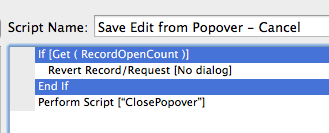
upload-1So, “do as little as possible”. This often means wrapping your commands in If() statements to see if they’re necessary. We don’t need to do this in Pro because we don’t notice things like “Revert Record” if they’re not needed. But in Web Direct, you really see Revert Record even if there is no record to revert.

Interestingly, “Commit Record” doesn’t cause a layout redraw when called unnecessarily.

We’ve also had great results using RefreshObject instead of RefreshWindow when we need a particular part of a layout to redraw. Refresh window is often substantially slower, to the point that never use it in WD. (You can gather the objects you want to refresh into refresh enclosures to make this simpler.)

Most of our thoughts on Web Direct are coming from porting our Pro Calendar to WebDirect. We’re also doing this for SeedCode Complete (!) so stay tuned.

Featured Posts

Follow Along

Stay up to date with the latest news & examples from SeedCode

Leave a Reply

Your email address will not be published. Required fields are marked *

Check out some of our other posts ...

DayBack for Supabase

FileMaker and Supabase We are very excited to be supporting Supabase as a datasource for DayBack Calendar. You can embed DayBack in your Supabase project, or see Supabase records alongside your FileMaker events in DayBack. (Supabase is a new calendar source for DayBack, not a separate product. So if you’re

Read More »

Visual Buffers: a More Accurate Calendar

Buffers in DayBack let you define padding before and after your events so you can see the time you need, not just the time you booked. Instead of squeezing appointments into every available minute, your calendar starts to reflect the reality of how your day unfolds. Buffers is ideal for travel time,

Read More »

Add Jobs to a Mapped Route in FileMaker

See When Assets are Passing by Unscheduled Jobs Showing unscheduled items on the map lets you see when a route is passing close to jobs you need to schedule. As you click on each truck, you’ll see it’s route for the day and find unscheduled jobs that would be good

Read More »

Scheduling Teams and Equipment

Seeing Availability at a Glance We recently customized DayBack for a customer who wanted to consolidates all the decisions of team assignments into a single screen. When a dispatcher clicks on a job, they can schedule the entire field team (technicians, lead, vehicle, departure plan, and equipment) without leaving the

Read More »

FOLLOW ALONG

Stay up to date with the latest news & examples from SeedCode

© 2026 SeedCode, Inc.